How to configure differential pressure for bidirectional scaling
{"nid":"6986","uuid":"99e3443d-cb9d-4d0d-b6be-62a1d97fcfff","vid":"7831","langcode":"und","revision_timestamp":"1656614268","status":"1","title":"How to configure differential pressure for bidirectional scaling","created":"1516827837","changed":"1692131351","promote":"0","sticky":"0","default_langcode":"1","revision_default":"1","revision_translation_affected":"1","path":{"alias":"\/resources\/tech-notes\/how-to-configure-differential-pressure-for-bidirectional-scaling","pid":"13596","langcode":"und"},"body":"<p>Set the PXU sensor to Bidirectional mode by moving the jumper to BI, as described in the attached manual.<\/p>\r\n\r\n<p>Once the jumper is set to Bidirectional you will need to launch the logger choosing the appropiate scale values based on your selection<\/p>\r\n\r\n<p>When you launch from HOBOware, choose the adapter cable for the external channels.<\/p>\r\n\r\n<p><p><drupal-media\n data-embed-button=\"embed_image\"\n data-entity-type=\"media\" data-width=\"437\" data-height=\"234\" data-entity-uuid=\"2f14f95b-a975-4e9b-a9b9-f58586ecfdd5\"><\/drupal-media><\/p><\/p>\r\n\r\n<p> <\/p>\r\n\r\n<p>Then choose the Scaling button to the right, and then Linear Scaling Assistant and Create new <\/p>\r\n\r\n<p> <\/p>\r\n\r\n<p><p><drupal-media\n data-embed-button=\"embed_image\"\n data-entity-type=\"media\" data-width=\"924\" data-height=\"518\" data-entity-uuid=\"8e58eea2-4a7b-49ca-8433-781610af8056\"><\/drupal-media><\/p><\/p>\r\n\r\n<p> <\/p>\r\n\r\n<p>Then select Save and complete the launch process.<\/p>\r\n\r\n<p>Wiring detail is also attached. <\/p>","applications":["Building Performance"],"associated_products":["MX1104","MX1104-TEMP-06","MX1105","T-VER-PXU-L","T-VER-PXU-X","UX120-006M"],"brand":"HOBO","documentation_hoboconnect":"0","documentation_intemp_app":"0","documentation_is_datasheet":"0","files":{"download_file":"https:\/\/dev-d9.onsetcomp.com\/sites\/default\/files\/resources-documents\/pxseries_i0c2.pdf"},"FIELDS":[["field_download_file","entity_reference","document"]],"meta_tags":"a:1:{s:6:\"robots\";s:7:\"noindex\";}","resource_topic":["Getting Started","Troubleshooting & Maintenance"],"resource_type":"Tech Note","tech_note_audience":["External"],"tech_note_type":["Hardware Training"]}
Set the PXU sensor to Bidirectional mode by moving the jumper to BI, as described in the attached manual.
Once the jumper is set to Bidirectional you will need to launch the logger choosing the appropiate scale values based on your selection
When you launch from HOBOware, choose the adapter cable for the external channels.
Then choose the Scaling button to the right, and then Linear Scaling Assistant and Create new
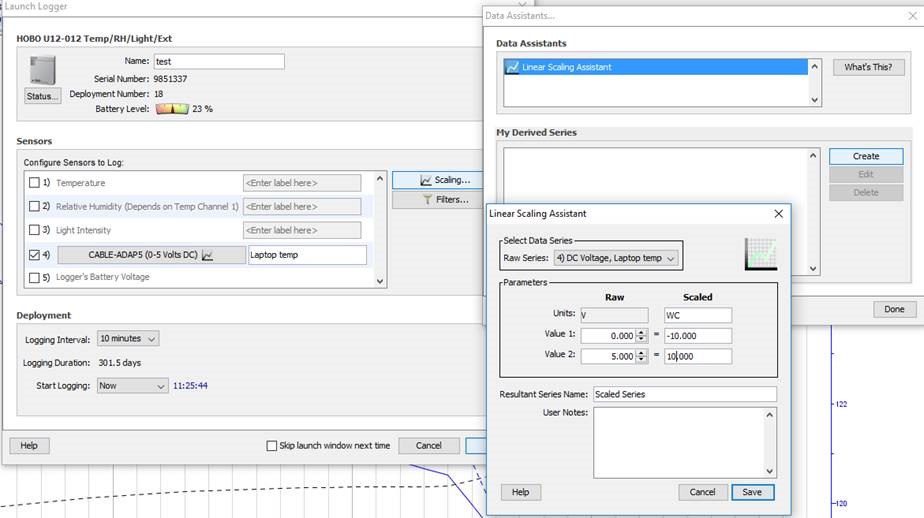
Then select Save and complete the launch process.
Wiring detail is also attached.